Digital Wallets and Tap to Pay: Is Apple Pay or Google Wallet Really Safer Than Your Card?

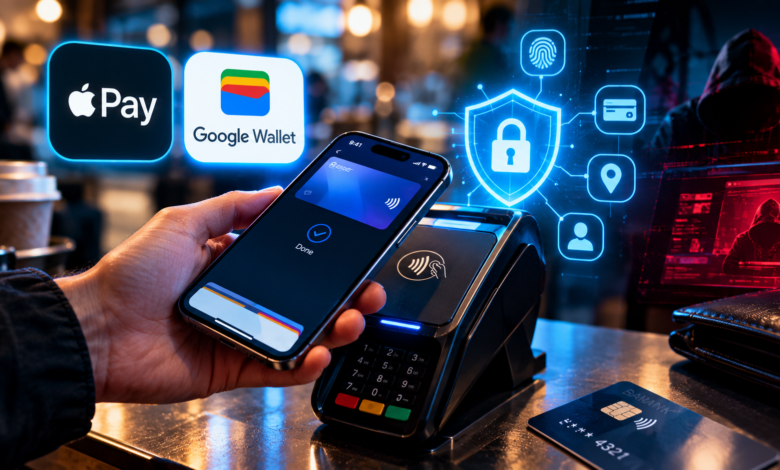
Yes, paying with a phone wallet is usually safer than swiping or typing in your physical card, because the merchant never sees your real card number. The real risks in 2026 are not hacked wallets but stolen phones, tricked users, and criminals who load stolen cards onto their own devices.
- What Is a Digital Wallet and How Does Tap to Pay Work?
- Why Digital Wallets Are Generally Safer Than Plastic Cards
- The Real Risks: Where Digital Wallet Fraud Actually Happens
- How to Set Up Your Digital Wallet Securely
- What to Do If Your Phone Is Lost, Stolen, or Your Card Is Added Without Permission
- Are Digital Wallets Safe for Online Shopping and Subscriptions?
- How to Choose Which Card to Put in Your Wallet
- Frequently Asked Questions About Digital Wallets and Tap to Pay
- Is Apple Pay or Google Wallet safer than using a credit card?
- Can someone steal my card by walking past me with an NFC reader?
- What happens if my phone is stolen?
- Why did I get a message that my card was added to a wallet?
- Do I need to worry about Ghost Tap?
- Is tap to pay safe for older adults?
- Should I keep using my physical card too?
- Conclusion: Safer Payments Start With Smart Settings
This guide explains how digital wallets protect you, where the weak spots are, and the simple settings that make tap to pay one of the safest ways to spend.
What Is a Digital Wallet and How Does Tap to Pay Work?
A digital wallet is an app on your phone or watch that stores a digital version of your payment cards. Examples include Apple Pay, Google Wallet, and Samsung Wallet. When you hold your phone near a payment terminal, it sends a secure payment signal using a short-range technology called NFC, which stands for near-field communication.
No card is swiped, no card number is read aloud, and in most cases you only need your fingerprint, face, or passcode to approve the payment.
How Tokenization Protects Your Card Number
The main security feature is tokenization. When you add a card to your wallet, the system does not store your real card number on the phone. Instead, it creates a unique substitute number, called a token, that is tied to your device.
When you pay, the merchant receives that token plus a one-time code, not your real number. If a store is hacked, the stolen token is useless on its own, because it only works with your specific device and can be shut off without replacing your physical card.
Compare that with a plastic card, where the same 16 digits are used every time, in every store, and online.
The Role of Biometrics and Device Security
Your phone adds a second layer. Before most payments are approved, the wallet asks you to confirm with Face ID, a fingerprint, or your passcode. The sensitive payment data is also stored in protected hardware or secure areas of the phone that apps cannot freely read.
The result is a system with three barriers: something unique to your device (the token), something you are (your face or fingerprint), and something you know (your passcode). For more on where this technology is heading, see our guide to biometric payments.
How Wallet Payments Compare With Other Methods
| Payment method | Does the store see your real card number? | Extra approval needed? | If a store is hacked |
|---|---|---|---|
| Phone or watch wallet | No, only a device token | Usually face, fingerprint, or passcode | Token is hard to reuse elsewhere |
| Physical card (tap) | Contactless sends a one-time code, not the full number | Often none for small purchases | Lower risk than swipe |
| Physical card (chip) | No, uses a one-time code | Sometimes a PIN | Lower risk than swipe |
| Physical card (swipe) | Yes, magnetic stripe data | None | Higher risk |
| Typing card number online | Yes, full number | Sometimes a code | Card must be replaced |
Why Digital Wallets Are Generally Safer Than Plastic Cards
Security experts routinely rate phone wallets as one of the most secure ways to pay in person. Here is why.
Protection From Skimmers and Data Breaches
Card skimmers are devices criminals attach to gas pumps, ATMs, and terminals to copy card data. They are designed to read cards, not tokens. When you pay with a wallet, there is no real number to steal at that moment.
If a retailer suffers a data breach, tokens stored in its systems are far less valuable than real card numbers. That is a big reason many banks encourage wallet use.
You Can Lock or Wipe a Lost Phone
If you lose a plastic card, anyone who finds it can try to use it until you notice. If you lose a phone, you can lock it remotely, mark it as lost, or erase it. Apple, Google, and Samsung all provide tools for this, and the stored cards are protected by your lock screen in the meantime.
Fewer Chances for Someone to Look Over Your Shoulder
When you pay online or on the phone, you read out or type digits, which can be seen, heard, or recorded. A wallet payment shows nothing but a checkmark.
The Real Risks: Where Digital Wallet Fraud Actually Happens
The wallet technology itself is strong. Criminals know that, so they attack the weak points around it: the moment a card is added, the phone itself, and you.
Provisioning Fraud: Stolen Cards Added to Someone Else’s Wallet
The most common problem today is called provisioning fraud. A criminal gets your real card details through a data breach, a fake website, or a phishing message. Then they try to add your card to a wallet on a phone they control.
To finish the setup, the bank usually sends a one-time code. Criminals trick victims into reading that code out loud, or they intercept it. Once the card is added, they can spend with it in stores, buy gift cards, or even sell the loaded phone to others.
That means an unexpected message that says your card was added to Apple Pay or Google Wallet is a red flag, even if your card is still in your hand.
Ghost Tap: Remote Tapping Scams
Security researchers have described a technique nicknamed “Ghost Tap.” Criminals load stolen cards into wallets, then use software that relays the NFC signal to another phone. A helper somewhere else can tap that phone on a payment terminal and charge the stolen card, even though the wallet is on a different device far away.
This mostly affects people whose card details were already stolen. It is another reason to treat any card-compromise alert seriously, and it is a good example of why a perfect payment technology can still be misused if the setup step is weak.
Lost or Stolen Phones
A phone with no lock, or one with a weak passcode, is the easiest target. Some wallets allow small contactless payments without re-entering a face or fingerprint, depending on settings and bank rules. If a thief also learns your passcode, they can often do much more damage, including changing account settings.
Phishing, Fake Texts, and Fake Wallet Messages
Scammers send texts claiming that your wallet has been “suspended” or that a purchase needs approval. They link to fake sites that capture your card details and verification codes. Some also pose as your bank and ask you to “confirm” a code, which is really the code that adds your card to their device.
This fits a broader pattern we explain in our guide to imposter scams: the attacker’s goal is to make you hand over the key.
Fake QR Codes and Payment Links
QR codes on parking meters, restaurant tables, and flyers can be replaced with stickers that lead to fake payment pages. Scammers also send payment links by message. Unlike a tap on a terminal, these links can send you to a website controlled by the criminal.
Account Takeover
If someone gains access to your Apple, Google, or Samsung account, they may be able to see your wallet details or add devices. A strong password is not enough. Turn on two-factor authentication and, where possible, use passkeys. Our article on passkeys and your bank account explains why they are so much harder to steal.
| Risk | How it works | Is the wallet itself broken? | Best defense |
|---|---|---|---|
| Provisioning fraud | Stolen card details added to a criminal’s device | No, the weak point is the setup step | Never share setup codes, use app-based approval |
| Ghost Tap | NFC signal relayed to another phone | No, it abuses already-stolen cards | Act fast on card alerts, keep alerts on |
| Lost or stolen phone | Thief tries to pay or reach accounts | No | Strong passcode, remote lock, Find My tools |
| Phishing texts | Fake messages capture codes and details | No | Never click, open the bank app yourself |
| Fake QR codes | Sticker leads to a fraud site | No | Use official apps, check the address |
| Account takeover | Criminal logs into your device account | No | Passkeys and two-factor authentication |
How to Set Up Your Digital Wallet Securely
A few minutes of setup go a long way. Follow these steps, and your wallet will be harder to attack than almost any card in your pocket.
- Use a strong, long passcode instead of a short four-digit one.
- Turn on face or fingerprint approval for payments.
- Enable remote lock and find-my-device features.
- Protect your device account with two-factor authentication or a passkey.
- Set up bank alerts for every card transaction.
- Check which cards and devices are linked and remove any you do not recognize.
- Keep your phone updated so security fixes arrive quickly.
- Be careful with automatic message previews, which can show verification codes on a locked screen.
Choose a Strong Passcode
A six-digit passcode is the minimum. A longer alphanumeric one is better. Avoid birthdays, repeated digits, and anything someone could guess from your social media. Thieves who watch you type your passcode in public can unlock your phone if it is simple.
Require Authentication for Payments
Check your wallet settings and your phone’s security options. Make sure payments need your face, fingerprint, or passcode. If your phone allows it, avoid keeping a card active for quick payments without authentication.
Turn On Alerts for Every Transaction
Transaction alerts are one of the best fraud tools available. In your banking app, enable push notifications for every purchase, even small ones. Fast alerts let you freeze a card within minutes. This matters even more in a world of real-time money movement, as our guide to instant payments explains.
Audit Your Wallet Every Few Months
Open the wallet app and check the list of cards. Remove old ones. In your device account, review the list of trusted devices and remove any you no longer use or do not recognize. Check your bank’s list of devices connected to your cards, if it offers one.
Hide Sensitive Previews
Some phones display text message content on the lock screen. If a setup code or bank code appears there, anyone nearby can see it. Change notification settings so that previews show only after you unlock the phone.
| Setting | Time needed | Cost | What it prevents |
|---|---|---|---|
| Long passcode | 2 minutes | Free | Thieves guessing or watching your code |
| Face or fingerprint for payments | 2 minutes | Free | Unapproved wallet use |
| Remote lock and find my device | 5 minutes | Free | Lost phone misuse |
| Two-factor authentication or passkey | 10 minutes | Free | Account takeover |
| Transaction alerts for all purchases | 5 minutes | Free | Late discovery of fraud |
| Hide lock screen previews | 2 minutes | Free | Code theft by onlookers |
| Wallet audit every 3 months | 10 minutes | Free | Forgotten cards and devices |
What to Do If Your Phone Is Lost, Stolen, or Your Card Is Added Without Permission
Speed matters. Act in minutes, not days.
If Your Phone Is Lost or Stolen
- Lock the phone remotely using your device’s find-my tool.
- Mark it as lost so that payment features are disabled and a message appears on the screen.
- Call your bank or card issuer and ask them to suspend digital wallet cards.
- Change your device account password and review recent activity.
- Report the theft to your mobile carrier so the SIM can be blocked.
- File a police report if needed, since some banks and insurers ask for it.
Avoid erasing the phone right away if you still hope to find it, because that may remove tracking. Lock and mark it as lost first, then decide.
If You See a Card Added You Did Not Authorize
Treat it as a security incident, even if you hold your physical card.
- Contact your bank immediately using the number on the back of your card.
- Ask them to remove the unknown wallet token and issue a new card number.
- Do not share any code with anyone who contacts you, even if they sound like the bank.
- Review recent transactions and report anything unfamiliar.
- Change passwords on your email and device accounts, because they may be compromised.
Know Your Rights
Under U.S. law, your liability for unauthorized credit card charges is capped at $50, and most issuers offer zero-liability policies. Debit cards are covered by different rules: your losses can be limited if you report quickly, but waiting too long can raise your exposure significantly. That is one more reason to use a credit card inside your wallet where you can, and to report problems immediately.
If you were tricked into authorizing a payment yourself, protections can be weaker and vary by situation. Report the fraud right away and ask your bank what options are available.
Are Digital Wallets Safe for Online Shopping and Subscriptions?
Most wallets also work at online checkouts. This can be safer than typing a card number, because the store receives a token and the checkout may skip the form-filling that scammers love to copy.
Why Wallet Checkout Is Often Better
When you use a wallet button on a trusted website, you avoid typing card details into a form. That helps against fake checkout pages and data-stealing scripts. It also reduces the information the store collects.
Watch Out for Subscriptions and Agents
Paying with a wallet does not make recurring charges disappear. Subscriptions may keep renewing, and you should review them regularly. Newer tools also let AI assistants make purchases for you, which raises fresh questions about approval and limits. Our guide on AI agents spending your money explains how to set boundaries before you hand over control.
How to Choose Which Card to Put in Your Wallet
The card you load matters almost as much as the wallet.
Credit Cards vs. Debit Cards
A credit card spends the bank’s money first, and disputes happen before your cash leaves your account. A debit card pulls money directly from your checking account, which can cause overdrafts and delays while you wait for a refund. For most people, a credit card is the safer choice inside a wallet, as long as you pay the balance in full each month.
Use Virtual Card Numbers When Possible
Some issuers and wallets offer virtual card numbers for online shopping. These are temporary or merchant-specific numbers linked to your real card. If one leaks, you can cancel it without replacing your whole card.
Keep Limits and Controls Turned On
Many banking apps let you set spending limits, block certain categories, or freeze a card with one tap. Use those controls. A frozen card cannot be used even if a token exists on a stolen phone.
| Card type in wallet | Fraud protection | Cash at risk during a dispute | Best for |
|---|---|---|---|
| Credit card | Strong, with federal limits and issuer policies | None until you pay the bill | Everyday spending |
| Debit card | Good if reported quickly | Your own cash can be tied up | People who avoid credit |
| Prepaid card | Varies by issuer | Limited to the balance | Budgeting and travel |
| Virtual card number | Strong, easy to cancel | Depends on the linked card | Online shopping and trials |
Frequently Asked Questions About Digital Wallets and Tap to Pay
Is Apple Pay or Google Wallet safer than using a credit card?
In most situations, yes. Wallets use tokenization, so merchants never receive your real card number, and payments usually require your face, fingerprint, or passcode. The main risks come from stolen phones and scams that trick you into adding cards or sharing codes.
Can someone steal my card by walking past me with an NFC reader?
This is a common fear, but it is very unlikely in practice. NFC works only at a distance of a few centimeters, and the payment data sent is tokenized and protected. Real-world cases of this type of theft are extremely rare compared with online fraud.
What happens if my phone is stolen?
Your wallet is protected by your lock screen, and you can lock or mark the phone as lost from another device. Call your bank, suspend wallet cards, and change your device account password. Acting quickly limits any damage.
Why did I get a message that my card was added to a wallet?
If you did not add it, someone may have used your card details to set it up on another device. Contact your bank right away, ask them to remove the unknown token, and request a new card number. Do not share any verification codes.
Do I need to worry about Ghost Tap?
Most people do not need to worry about it directly. It involves criminals who already have stolen card details and load them into wallets. Alerts, quick reporting, and strong account security make it much harder for them to profit.
Is tap to pay safe for older adults?
It can be very safe if the phone has a strong lock, alerts are on, and the person knows the key rule: never share a verification code with anyone. Family members can help set up the wallet, alerts, and a call-back habit for any suspicious message.
Should I keep using my physical card too?
Yes, as a backup. But keep it in a safe place, and use the wallet when possible. If your card number is stolen, your wallet token may need to be reissued as well, so tell your bank about the fraud promptly.
Conclusion: Safer Payments Start With Smart Settings
Digital wallets are among the safest ways to pay. Tokenization, biometrics, and remote locking give them real advantages over plastic cards. The risks that remain are mostly human: sharing a code, ignoring an alert, or using a weak passcode.
Set a strong passcode, protect your device account with two-factor authentication or a passkey, turn on alerts for every purchase, use a credit card inside your wallet, and never read a verification code to anyone who contacts you. Check your wallet and linked devices every few months.
If you remember one idea, make it this: the wallet protects your card number, but only you can protect the codes that unlock it. Take ten minutes today to review your phone’s security settings and your bank alerts, and your tap to pay will be safer than almost any card in your pocket.
This article is for general information only and is not financial, legal, or security advice. Features, bank policies, and consumer protections vary by provider and country and change over time, so confirm details with your bank and wallet provider before you act.