SIM Swap Scams: How Criminals Hijack Your Phone Number to Reach Your Money and How to Stop Them

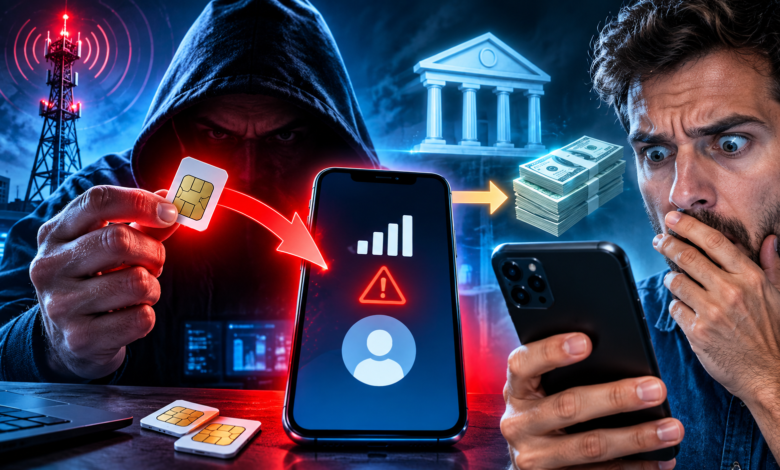
A SIM swap scam happens when a criminal convinces your mobile carrier to move your phone number onto a SIM card they control. From that moment, your calls, texts, and verification codes go to them. This guide explains how the attack works and the free steps that make you a much harder target.
- What Is a SIM Swap Scam and How Does It Work?
- Why SIM Swapping Is Still a Serious Threat in 2026
- How to Spot a Hijacked Number Early
- How to Protect Your Phone Number: A Practical Plan
- What to Do If You Think You Were SIM Swapped
- Frequently Asked Questions About SIM Swap Scams
- Can someone SIM swap me with only my phone number?
- Does an eSIM protect me from SIM swapping?
- Is a SIM swap the same as my phone being hacked?
- Are text message codes still safe to use?
- Will my bank refund money lost in a SIM swap?
- How fast can a SIM swap happen?
- Should I change my phone number after an attack?
- Conclusion: Make Your Phone Number Worthless to Thieves
What Is a SIM Swap Scam and How Does It Work?
A SIM card is the small chip, physical or built into your phone as an eSIM, that tells a mobile network which phone number belongs to which device. A SIM swap, sometimes called SIM hijacking, tricks the carrier into linking your number to a different SIM.
Your phone is not hacked. Your number is moved. That difference matters, because the best antivirus app in the world cannot stop an attack that happens inside a carrier’s customer service system.
Your Phone Number Is a Master Key
Over the past decade, phone numbers quietly became identity documents. Banks, email providers, crypto exchanges, and payment apps all use them to send one-time codes by text message.
If a stranger controls your number, they receive those codes. A criminal who knows your email address and a few personal details can click “forgot password,” wait for the text, and walk into the account.
That makes your number worth far more than most people realize. It is often the recovery key for your email, and your email is the recovery key for almost everything else you own online.
How the Attack Unfolds, Step by Step
Every SIM swap is a little different, but most follow the same five stages:
- Research. The criminal collects your name, address, birth date, and phone number from data leaks, people-search websites, and social media.
- Impersonation. They contact your carrier by phone, online chat, or in a store, pretending to be you. The usual story is a lost phone or a damaged SIM.
- The swap. If the agent is fooled, or in some documented cases bribed, your number is activated on the attacker’s SIM. Your own phone drops to “No Service.”
- Password resets. The attacker requests reset codes by text for your email first, then your bank, exchange, or payment apps.
- Cash-out. They move money, change contact details, and sometimes lock you out. In some cases the whole sequence takes less than an hour.
Notice that the weakest link is not your password. It is a human process that decides whether a caller sounds like you.
SIM Swap vs. Port-Out Fraud
You will often hear a second term, port-out fraud. The two attacks have the same goal, which is taking over your number, but they work through different doors.
| SIM swap | Port-out fraud | |
|---|---|---|
| What happens | Your number is moved to a new SIM at the same carrier | Your number is transferred to a different carrier |
| Where the attacker acts | Your existing carrier’s support channels | A second carrier, using your account details |
| What you notice | Your phone loses service | Your phone loses service |
| Best defense | Account PIN and SIM change lock | Port-out lock and a separate transfer PIN |
In practice, a good carrier account setup blocks both. We will cover exactly how in the protection plan below.
Why SIM Swapping Is Still a Serious Threat in 2026
SIM swapping is not new, and that is exactly why people underestimate it. The tactic has been around for years, yet it keeps working because it attacks people and processes, not technology.
What the FBI Numbers Show
The FBI’s Internet Crime Complaint Center, known as IC3, tracks SIM swapping as its own category. The reported figures climbed sharply, peaked in 2022, and have fallen since.
| Year | Complaints reported to IC3 | Reported losses |
|---|---|---|
| 2021 | 1,611 | More than $68 million |
| 2022 | 2,026 | About $72.7 million |
| 2023 | 1,075 | About $48.8 million |
| 2024 | 982 | About $26 million |
Sources: FBI IC3 public service announcement (2021 figures) and IC3 annual reports (2022 to 2024). The latest full-year data I could verify is 2024.
It is tempting to read a falling line as good news. Security analysts caution against that conclusion for three reasons.
- Only reported crimes are counted. Many victims never file a complaint with IC3.
- SIM swaps are often the first step, not the final one. The theft itself may be recorded under another category, such as account takeover or cryptocurrency fraud.
- Criminals adapt. When carriers tighten one process, attackers look for another door.
The safest assumption is that the threat is still active, even if the headline numbers look smaller.
Who Gets Targeted
Many people imagine that only wealthy investors or crypto traders are at risk. They are certainly attractive targets, but they are not the only ones.
Criminals tend to go after:
- Crypto holders, because stolen funds can be moved quickly and are hard to recover.
- Anyone with a public profile, such as business owners, influencers, or executives.
- Older adults. One analysis of the FBI’s 2024 data found that people aged 60 and over reported the highest losses in this category.
- Anyone whose personal data has leaked, because the attacker needs details to sound convincing.
That last point is important. If your name, address, and birth date appear on people-search sites, you are a cheaper target than someone who has cleaned up their data. We explain how to do that in our guide to data brokers and your financial privacy.
What U.S. Carriers Must Now Do
Regulators have noticed the problem. On November 15, 2023, the Federal Communications Commission adopted rules aimed at SIM swap and port-out fraud. The requirements started taking effect in stages from January 2024.
In plain language, wireless providers must now:
- Use secure methods to verify who you are before changing a SIM or transferring a number.
- Notify you immediately when a SIM change or port-out request is made on your account.
- Train employees to recognize and handle this type of fraud.
- Offer a clear way to report fraud, investigate it, and provide documentation, at no cost to you.
- Offer protections such as account locks that block unauthorized transfers.
The rules set a baseline, not a guarantee. Each carrier decides how to meet them, so quality still varies. Outside the United States, requirements differ by country, so check what your own carrier and regulator offer.
How to Spot a Hijacked Number Early
Speed is everything. The sooner you notice, the sooner your carrier and bank can cut off the attacker. The signs show up in two places: on your phone and in your accounts.
Warning Signs on Your Phone
Watch for any of these, especially if several appear together:
- Sudden loss of service. Your phone shows “No Service” or “SOS only” even though you are in a coverage area and the phone worked minutes ago.
- Calls and texts stop arriving. Friends say your phone goes straight to voicemail, or you stop receiving verification codes.
- Unexpected carrier messages. You get a text or email about a SIM change, number transfer, or new eSIM activation that you did not request.
- Codes you never asked for. One-time passcodes arrive for logins or resets you did not start.
A dead signal on its own can be an ordinary outage. A dead signal plus a surprise message from your carrier is a red flag worth acting on immediately.
Warning Signs in Your Accounts
Even if you do not notice your phone, your accounts may tell the story:
- Password reset emails for your email, bank, or exchange accounts that you did not request.
- Login alerts from new devices or unfamiliar locations.
- Changed contact details, such as a new phone number or email on a financial account.
- Bank notifications about new payees, large transfers, or card changes.
If you see any of these, do not wait to confirm. Treat it as an emergency and jump to the response plan later in this guide.
How to Protect Your Phone Number: A Practical Plan
You cannot stop criminals from trying. You can make your number a poor target. The plan below takes about an hour in total and costs nothing.
- Lock your carrier account with a strong PIN and a number or SIM lock.
- Turn on carrier alerts for any SIM change or transfer request.
- Move your email to an authenticator app or passkey before anything else.
- Do the same for your bank, exchange, and payment apps.
- Remove your personal details from people-search sites.
- Freeze your credit so an attacker cannot open new accounts.
- Review your setup every few months.
Lock Down Your Carrier Account
Your carrier is the front door, so start there. Log in to your account or call customer service from your own phone and review these settings:
- Set or change your account PIN or passcode. Avoid birthdays, repeated digits, and the last four digits of your Social Security number. Pick something that cannot be found in a data leak.
- Turn on the number lock or SIM protection feature. Names vary by company. At the time of writing, Verizon calls its feature Number Lock and AT&T offers Wireless Account Lock, but check your carrier’s current options.
- Ask for a separate transfer PIN for port-out requests, if your carrier supports one.
- Enable account alerts by text, email, or app notification for any change.
- Limit authorized users and remove anyone who no longer needs access.
- Ask whether in-store changes require photo ID and a passcode.
A quick note on eSIMs. An eSIM removes the risk of someone stealing your physical card, but it does not stop a SIM swap. The attacker still targets your carrier account, so the same locks and PINs apply.
Move Important Accounts Away From Text Message Codes
A SIM swap is dangerous because so many accounts still rely on text messages for verification. Remove that dependency and the attack loses most of its value.
From strongest to weakest, your options are roughly:
- Passkeys or hardware security keys. These cannot be intercepted through your phone number. Our article on passkeys and your bank account explains how they work.
- Authenticator apps. These generate codes on your device, not through the carrier network.
- Text message codes. Better than nothing, but vulnerable to exactly this attack.
Prioritize your primary email account above everything else, since it can reset the rest. Then move to your bank, brokerage, crypto exchange, and payment apps. If a service only offers text codes, ask yourself whether it needs to be connected to money at all.
Also store your backup recovery codes somewhere safe and offline, such as a locked drawer or a password manager with strong protection.
Reduce What Criminals Can Learn About You
A convincing impersonation needs facts. The fewer facts a stranger can find, the harder the call to your carrier becomes.
- Remove yourself from people-search sites, which often list your address, relatives, and phone number.
- Keep your birth date and phone number off social media, or limit who can see them.
- Use a separate email address for banking and financial accounts, one that is not published anywhere.
- Be careful with “hello” and “yes” calls. Short recordings of your voice can feed scams like the ones we describe in our guide to deepfake scams and AI voice cloning.
- Place a credit freeze with each major credit bureau. In the United States it is free and prevents new accounts from being opened in your name.
Your Protection Checklist at a Glance
| Action | Time needed | Cost | What it stops |
|---|---|---|---|
| Strong carrier PIN | 5 minutes | Free | Impersonation at customer service |
| Number or SIM lock | 10 minutes | Free | Unauthorized SIM swaps and port-outs |
| Carrier change alerts | 5 minutes | Free | Late discovery of an attack |
| Authenticator app or passkey on email | 15 minutes | Free | Account resets through text codes |
| Same upgrade on bank and exchange | 30 minutes | Free | Direct theft after a number hijack |
| People-search opt-outs | 1 to 2 hours | Free | Easy research for attackers |
| Credit freeze | 30 minutes | Free | New accounts opened in your name |
What to Do If You Think You Were SIM Swapped
If you recognize the warning signs, do not panic and do not wait. The first hour often decides how much is lost. Use another phone or a computer, since your own number may no longer be yours.
The First 30 Minutes
Work through these steps in order:
- Call your carrier from another phone. Ask them to restore your SIM, lock the account, and tell you exactly what was changed. Use the official number from their website.
- Call your bank and card issuers. Use the number on the back of your card. Ask them to freeze accounts, block transfers, and review recent activity.
- Secure your email first. From a trusted device, change your email password and switch on app-based or passkey verification. Then repeat for other financial accounts.
- Check payment apps and crypto exchanges. Look for new devices, new payees, and withdrawals, and freeze or lock what you can.
- Place a credit freeze if you have not already.
- Save the evidence. Take screenshots of alerts, messages, and account activity, and write down the time you noticed the problem.
Reporting and Recovery
Reporting helps your own case and helps investigators see patterns. In the United States, these are the main places to go:
| Where to report | Why it matters |
|---|---|
| Your carrier’s fraud department | Documents the incident and restores your service |
| Your bank or card issuer | Starts a fraud claim and may stop pending transfers |
| FBI Internet Crime Complaint Center (ic3.gov) | Federal record of cyber-enabled fraud |
| FTC at IdentityTheft.gov | Creates a recovery plan for identity theft |
| FCC consumer complaint center | Flags carrier failures to the regulator |
| Local police | Provides a report that banks and insurers may request |
Whether you recover your money depends on the situation, your country, and how fast you report. Transactions you did not authorize generally receive stronger protection than payments you were tricked into sending, so report immediately and ask your bank what applies to you.
Finally, be careful after the attack. Fraudsters sometimes contact victims offering to recover stolen money for a fee. That is usually a second scam, and we describe the pattern in our guide to deepfake scams. Only use contact details you find yourself.
Frequently Asked Questions About SIM Swap Scams
Can someone SIM swap me with only my phone number?
The phone number alone is not enough, because the carrier should verify identity. But attackers fill the gaps with leaked data, social engineering, or help from a dishonest insider. That is why carrier locks and a strong PIN matter so much.
Does an eSIM protect me from SIM swapping?
Not by itself. An eSIM prevents someone from stealing a physical card, but attackers can still ask your carrier to move your number to a new eSIM. The same account PIN, number lock, and alerts protect you either way.
Is a SIM swap the same as my phone being hacked?
No. In a SIM swap your phone is untouched. The attacker takes over your phone number at the carrier, so your phone simply loses service while theirs receives your texts and calls.
Are text message codes still safe to use?
They are better than a password alone, but they are the weakest form of two-factor protection against this specific attack. Use an authenticator app or passkey whenever a service offers one, and keep text codes as a last resort.
Will my bank refund money lost in a SIM swap?
It depends on your country, your bank’s policy, and whether the transactions count as unauthorized. Report the fraud right away, give your bank the evidence you saved, and ask what protections apply to your accounts.
How fast can a SIM swap happen?
Sometimes within minutes once the attacker passes the carrier’s checks. The money movement that follows can also happen quickly, which is why alerts and fast reporting are so valuable.
Should I change my phone number after an attack?
Usually it is not necessary. A better approach is to lock the number, move your accounts to app-based or passkey verification, and update the recovery details on every important account. Changing the number only helps if you also change how your accounts verify you.
Conclusion: Make Your Phone Number Worthless to Thieves
SIM swap scams work because we trained the internet to treat a phone number as proof of identity. A criminal who captures that number gets a shortcut to your email, your bank, and your savings, without ever touching your phone.
The fix is not complicated. Lock your carrier account, turn on alerts, move your key accounts to an authenticator app or passkey, and reduce the personal details strangers can find. Then keep an eye out for the warning signs and act quickly if they appear.
If you remember one idea, make it this: your phone number should never be the only thing standing between a stranger and your money. Take thirty minutes this week to set a carrier PIN and upgrade the verification on your email, and you will be ahead of most people.
This article is for general information only and is not financial, legal, or security advice. Carrier features, regulations, and fraud statistics change over time, so confirm details with your carrier, your bank, and official agencies before you act.